
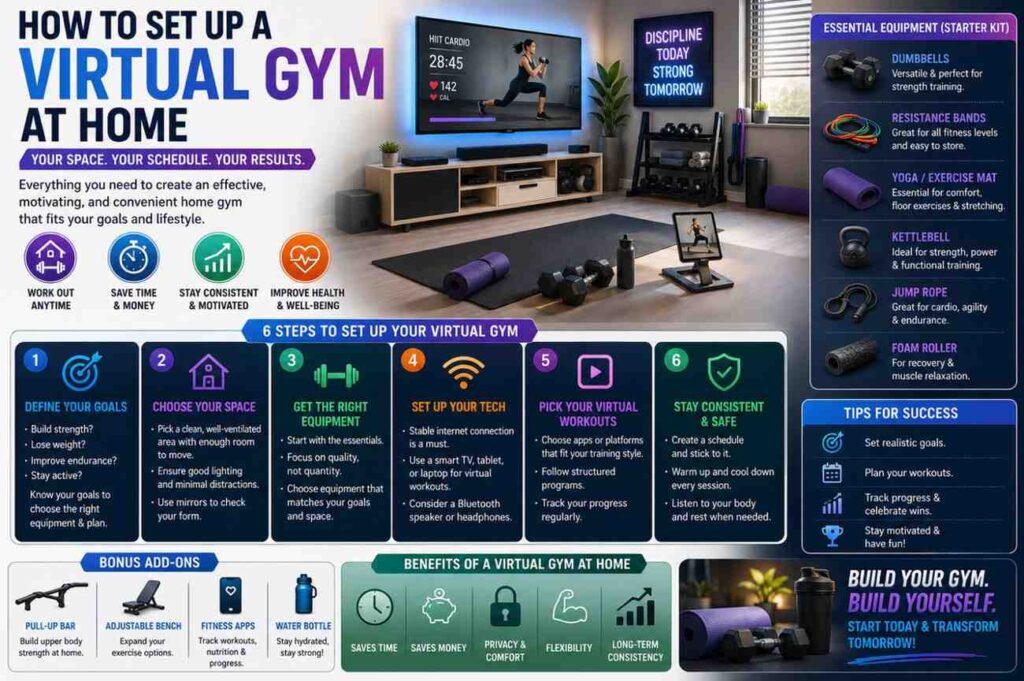
How to Set Up a Virtual Gym at Home: A Practical Beginner Guide
Learning How to Set Up a Virtual Gym at Home is one of the most practical ways to make fitness more accessible, flexible, and sustainable. A virtual gym gives you the structure of guided training without requiring a daily commute, expensive membership, or a large dedicated room. With the right setup, you can follow live classes, stream on-demand workouts, track your progress, and build a balanced routine that fits naturally into your schedule.
The best virtual gym is not necessarily the most expensive one. In fact, many effective home fitness spaces begin with a yoga mat, a stable internet connection, a screen, and a clear plan. What matters most is creating an environment that helps you exercise consistently, safely, and comfortably. Whether you are a beginner in building confidence or an experienced exerciser looking for more convenience, a virtual gym can support strength training, cardio, mobility, recovery, and general wellness.
This guide explains how to plan your space, choose technology, select equipment, follow online workouts safely, and build a routine you can maintain long term.
Quick Answer About How to Set Up a Virtual Gym at Home
To set up a virtual gym at home, start by choosing a safe workout space with enough room to move comfortably. Add a screen such as a phone, tablet, laptop, or smart TV so you can follow workouts clearly. Next, choose a fitness app, online class platform, or virtual training program that matches your goals. Then, add basic equipment such as a mat, resistance bands, dumbbells, a towel, and a water bottle.
A successful setup should be simple enough to use often. For example, if it takes 20 minutes to move furniture, connect devices, and find equipment, you are less likely to stay consistent. Instead, aim for a setup that can be ready in a few minutes. Keep your equipment nearby, test your internet connection, and choose workout programs that match your current ability level.
A virtual gym can work for strength training, yoga, Pilates, cardio, cycling, stretching, mobility, and recovery sessions. The key is to begin with realistic expectations, follow proper form, and gradually increase workout difficulty over time.
Plan Your Virtual Gym Setup Before Buying Anything
A strong virtual gym begins with planning, not shopping. Before you buy equipment or subscribe to an app, take time to understand what you want your home fitness space to achieve. This step helps you avoid unnecessary purchases and creates a setup that supports your actual lifestyle. For example, someone focused on yoga and mobility may only need a mat, blocks, and a tablet, while someone focused on strength training may need dumbbells, bands, and more floor space.
Planning also helps you identify practical limits. Your available space, budget, noise restrictions, floor type, internet quality, and schedule all affect your final setup. A small apartment can still support an excellent virtual gym, but it may require low-impact workouts, foldable equipment, and smart storage. A spare room may allow larger equipment such as a bike, treadmill, or weight bench.
The goal is to create a space that removes friction. When your workout area is easy to access, well organized, and matched to your goals, exercising at home becomes far more realistic and enjoyable.
Define Your Fitness Goals Clearly
Clear fitness goals help you choose the right workouts, equipment, and training schedule. Instead of saying, “I want to get fit,” defines what fitness means for you. It might mean building strength, improving flexibility, increasing stamina, reducing stress, improving posture, or staying active during a busy school or work schedule. A focused goal makes every decision easier.
For example, if your main goal is strength, prioritize resistance bands, dumbbells, and structured strength classes. If your goal is better mobility, choose yoga, stretching, or Pilates programs. If your goal is general health, combine cardio, strength, and recovery sessions throughout the week. Keep your goals realistic and measurable. A simple target such as “complete three workouts per week” is often more useful than an overly ambitious plan that is difficult to maintain.
Choose the Right Space at Home
Your virtual gym space does not need to be large, but it should be safe, clear, and comfortable. A mat-sized area is enough for many workouts, including yoga, stretching, core training, Pilates, and bodyweight exercises. For cardio or strength workouts, try to leave extra room around your body so you can step, lunge, squat, and extend your arms without bumping into furniture.
Pay attention to flooring, ventilation, lighting, and noise. A non-slip mat can improve safety on hard floors, while a fan or open window can make longer workouts more comfortable. If you live in an apartment, choose low-impact classes to reduce noise for people below you. Good lighting also matters because it helps you see your movement clearly and follow instructors more easily.
Choose the Best Technology for a Home Virtual Gym
Technology is what turns a basic home workout space into a virtual gym. However, the setup does not have to be complicated. At minimum, you need a screen, reliable internet, and clear audio. These three things allow you to follow workouts without constantly pausing, rewinding, or adjusting your device. A smooth viewing experience helps you stay focused on movement rather than troubleshooting.
Your technology choices should match your workout style. For floor workouts, a tablet or TV may be easier to see than a small phone. For cycling or treadmill workouts, a screen placed at eye level can reduce neck strain. For live classes, you may want a device with a camera, so an instructor can view your form, if that feature is available.
Audio is also important. Built-in speakers may work quiet workouts, but Bluetooth speakers or headphones can help you hear instructions clearly. Keep chargers nearby, check your Wi-Fi signal, and test your setup before beginning a new program. Small technical improvements can make your workouts feel more professional and enjoyable.
Pick a Screen That Fits Your Workout Style
The best screen depends on how you train. A phone is convenient for quick workouts, but it can be difficult to see during full-body exercises. A tablet offers a better balance between portability and visibility. A laptop works well for longer classes, while a smart TV provides the clearest view for living room workouts.
Think about viewing angles. During strength training, you may move between standing, kneeling, and lying down, so place the screen where it remains visible from multiple positions. For yoga or stretching, avoid placing the screen too high because you may need to see it from the floor. For cycling, rowing, or treadmill workouts, keep the screen stable and close to eye level.
Select Workout Apps or Online Fitness Classes
Workout apps and online fitness classes provide structure, coaching, and variety. Some platforms focus on general fitness, while others specialize in yoga, cycling, strength training, dance, Pilates, or mobility. Choose a platform based on your goals, experience level, available equipment, and preferred coaching style.
Beginners should look for clear instructions, warmups, cooldowns, beginner modifications, and progressive programs. More advanced users may prefer apps with performance tracking, structured training blocks, heart rate guidance, or strength progression. It is also helpful to test free trials before committing a subscription. The best app is not always the most popular one; it is the one you will actually use consistently.
| Platform Type | Best For | Basic Equipment Needed |
| General fitness app | Strength, cardio, yoga, mobility | Mat, bands, dumbbells |
| Live class platform | Motivation and accountability | Screen, internet, optional weights |
| Cycling or running app | Indoor endurance training | Bike, treadmill, or trainer |
| Yoga and mobility app | Flexibility, posture, recovery | Mat, blocks, quiet space |
| Strength program app | Progressive resistance training | Dumbbells, bands, bench optional |
Buy Simple Equipment for How to Set Up a Virtual Gym at Home
Equipment should make your workouts more effective, not more complicated. When deciding How to Set Up a Virtual Gym at Home, start with versatile tools that support many types of training. You do not need to buy large machines immediately. In many cases, a small collection of affordable equipment can cover strength, cardio, mobility, balance, and recovery.
The most useful home gym items are compact, easy to store, and suitable for different fitness levels. A mat supports stretching, core work, yoga, Pilates, and floor exercises. Resistance bands help with strength training, activation drills, warmups, and rehabilitation-style movements. Dumbbells allow you to train major muscle groups with simple exercises such as squats, rows, presses, and lunges.
Before adding expensive smart equipment, test your routine for a few weeks. Notice which workouts you enjoy and which tools you reach most often. This approach prevents clutter and helps you invest in equipment that genuinely supports your long-term fitness habits.
Start With Beginner-Friendly Essentials
A beginner-friendly virtual gym can be built with just a few items. Start with a quality exercise mat, a set of resistance bands, one or two pairs of dumbbells, a towel, and a water bottle. These basics are enough for hundreds of guided workouts, including strength circuits, stretching sessions, Pilates routines, and low-impact cardio classes.
Resistance bands are especially practical because they are lightweight, affordable, and easy to store. They can be used for rows, presses, glute bridges, shoulder warmups, and mobility work. Dumbbells add more challenges when bodyweight exercises become too easy. Choose weights that feel manageable but still challenging during the final few repetitions of an exercise.
Add Smart Fitness Equipment Later
Smart fitness equipment can improve motivation, tracking, and interactivity, but it is not required at the beginning. Connected bikes, smart trainers, rowers, treadmills, mirrors, and wearable devices can provide real-time metrics, guided programs, and immersive workout experiences. These tools are most useful when they match a workout style you already enjoy.
For example, if you consistently enjoy indoor cycling, a smart bike or trainer may be a worthwhile upgrade. If you prefer strength training, adjustable dumbbells or a compact bench may offer more value. Add equipment gradually and only when it solves a specific problem, such as limited resistance, poor tracking, or lack of workout variety.
Create a Safe and Balanced Home Workout Plan
A virtual gym is most effective when it supports a balanced training routine. Instead of doing random workouts every day, build a plan that includes strength, cardio, mobility, and recovery. This helps you improve overall fitness while reducing the risk of overuse, burnout, or boredom. A balanced routine also makes progress easier to track because each workout has a clear purpose.
For beginners, consistency matters more than intensity. Three well-planned workouts per week are often better than an aggressive plan that becomes difficult to maintain. Advanced users can add more volume, but recovery should still be part of the schedule. Your body needs time to adapt, especially when increasing resistance, duration, or workout frequency.
A good virtual workout plan should also include warmups and cooldowns. Warmups prepare your joints and muscles for movement, while cooldowns help you transition out of exercise comfortably. Choose classes that include both or add your own five-minute warmup and stretching routine before and after workouts.
Use a Weekly Training Structure
A weekly structure keeps your routine organized and reduces decision fatigue. Instead of asking, “What should I do today?” You can follow a simple schedule that balances different types of training. This is especially helpful when using several apps or online class libraries because too many choices can become overwhelming.
A beginner schedule might include two strength days, two cardio days, one mobility day, and two rest or light activity days. For example, you could do strength training on Monday and Thursday, low-impact cardio on Tuesday and Friday, yoga on Saturday, and rest on Wednesday and Sunday. This pattern gives your body variety while still allowing recovery between harder sessions.
| Day | Workout Type | Example |
| Monday | Strength | Full-body dumbbell or band workout |
| Tuesday | Cardio | Low-impact intervals or brisk walking |
| Wednesday | Recovery | Gentle stretching or rest |
| Thursday | Strength | Lower body, upper body, or core class |
| Friday | Cardio | Dance, cycling, or treadmill session |
| Saturday | Mobility | Yoga, Pilates, or flexibility work |
| Sunday | Rest | Light movement, hydration, and recovery |
Track Intensity Without Guessing
Tracking intensity helps you train safely and make steady progress. You do not need advanced equipment to do this. A simple method is the talk test: during moderate activity, you should be able to speak in short sentences but not comfortably sing. During harder workouts, speaking becomes more difficult, and you may need longer recovery breaks.
Wearable devices can also track heart rate, workout duration, steps, and estimated effort. These tools are useful, but they should not replace how your body feels. Pay attention to breathing, form, energy, and recovery. If your form breaks down or you feel unusually exhausted, reduce intensity or choose a lower-impact option. Progress should feel challenging but manageable, not punishing.
Make Your Virtual Gym Comfortable and Easy to Use
Comfort plays a major role in consistency. A virtual gym that feels awkward, cluttered, or inconvenient will be harder to use regularly. Your goal is to create a workout area that feels ready whenever you are. That means your equipment should be easy to access, your screen should be simple to set up, and your space should feel safe and inviting.
Think of your virtual gym as a small system. The fewer steps required to begin, the more likely you are to follow through. Keep your mat rolled nearby, store bands in a basket, place dumbbells where they are visible but not in the way and keep chargers close to your workout screen. These small details remove common barriers.
Comfort also includes temperature, sound, and privacy. A fan can make cardio sessions easier. Good audio helps you follow instructions. A quiet space helps you focus. When your environment supports your workout, the entire experience feels smoother and more sustainable.
Organize Your Workout Zone
An organized workout zone saves time and helps prevent distractions. Store your most-used items together, so you do not have to search for them before each session. A small shelf, basket, storage cube, or wall hook can keep mats, bands, towels, and accessories in one place. If your space is shared, choose storage that is compact and easy to move.
Also consider safety. Keep loose cables, toys, bags, and furniture away from your movement area. Check that your mat lies flat and that weights are not placed where you might trip over them. Good organization is not only about appearance; it directly affects how smoothly and safely your workouts run.
Reduce Distractions During Online Workouts
Distractions can make home workouts less effective, especially when you are following an instructor. Before starting, silence notifications, close unrelated browser tabs, and let others in your home know that you are exercising. If you use your phone as your workout screen, turn on Do Not Disturb, so messages do not interrupt the class.
Pets, noise, and household tasks can also pull your attention away. Try to choose a consistent workout time when interruptions are less likely. Even a 20-minute workout becomes more valuable when you can focus fully on movement, breathing, and form. A distraction-free environment helps you train with better quality and lowers the chance of careless mistakes.
Keep Your Virtual Gym Routine Sustainable
The long-term success of a virtual gym depends on sustainability. It is easy to feel motivated at the beginning, buy new equipment, and sign up for several platforms. The real challenge is building a routine you can continue after the excitement fades. Sustainable fitness should fit your schedule, energy level, space, and budget.
Start with a realistic number of workouts per week. For many people, three sessions are enough to build momentum. As your confidence grows, you can add more workouts or increase intensity. Avoid changing everything at once. Small, consistent improvements usually work better than dramatic routines that are hard to maintain.
Sustainability also means allowing flexibility. Some weeks will be busier than others. When that happens, shorter workouts, recovery sessions, or simple walks can help you stay active without feeling like you have failed. A virtual gym should support your life, not create pressure. The best routine is one that helps you return and again.
Review Your Progress Every Two Weeks
Regular reviews help you understand what is working and what needs adjustment. Every two weeks, look at your workout frequency, energy levels, recovery, and enjoyment. Ask yourself whether your current app, schedule, and equipment still support your goals. If you are skipping workouts often, the issue may be timing, difficulty, boredom, or setup friction.
Track simple details such as workout type, duration, effort level, and how you felt afterward. You do not need a complicated spreadsheet. A notebook, calendar, or fitness app can work well. Over time, these notes reveal patterns. You may notice that morning workouts are easier to complete, or that strength classes feel better after a rest day.
Know When to Adjust Your Plan
Your plan should evolve as your fitness improves. If workouts begin to feel too easy, you can increase resistance, add repetitions, choose longer classes, or reduce rest periods slightly. If workouts feel too difficult, scale back intensity, choose beginner modifications, or add more recovery time. Adjustment is part of smart training.
It is also important to respond to lifestyle changes. Exams, work deadlines, travel, poor sleep, or stress may require a lighter schedule. That does not mean you are losing progress. It means you are adapting wisely. A sustainable virtual gym routine should be flexible enough to support both high-energy weeks and lower-energy weeks.
Frequently Asked Questions
Setting up a virtual gym can feel overwhelming at first because there are so many apps, devices, and equipment options available. However, most people only need a simple setup to begin. The most common questions usually involve space, cost, equipment, workout frequency, and whether online training can truly be effective.
The answers below focus on practical guidance for beginners while still offering useful insight for more experienced users. The main idea is to start with the essentials, build consistency, and upgrade only when your routine becomes stable. A virtual gym should be convenient, safe, and flexible. It does not need to copy a commercial gym or include every popular fitness gadget.
Use these FAQs as a quick reference when planning your setup, choosing equipment, or adjusting your home workout routine.
What do I need to start a virtual gym at home?
You need a clear workout space, a reliable screen, stable internet, and a fitness platform or online class source. For equipment, start with a mat, resistance bands, and optional dumbbells. A towel, water bottle, and supportive shoes are also useful depending on the workout type.
The most important requirement is not equipment but consistency. Choose a setup that is easy to use several times per week. A simple, well-organized corner can be more effective than a room full of equipment that feels inconvenient to maintain.
Can I set up a virtual gym in a small apartment?
Yes, a small apartment can work very well for a virtual gym. Many workouts require only enough space for a mat and safe arm movement. Yoga, Pilates, stretching, bodyweight strength training, and low-impact cardio are especially suitable for limited spaces.
Focus on compact equipment such as resistance bands, foldable mats, adjustable dumbbells, and vertical storage. Choose low-noise workouts if you have neighbors below you. You can also move a coffee table or chair temporarily to create a workout zone, then return the room to normal afterward.
Are online fitness classes effective?
Online fitness classes can be effective when they match your fitness level, goals, and schedule. Good classes provide clear instruction, proper pacing, warmups, cooldowns, and modifications for different ability levels. They also help reduce guesswork, which is useful for beginners who are not sure how to structure workouts.
Effectiveness depends on how consistently you participate and whether you use proper form. Advanced users can benefit from structured programs, performance tracking, and progressive workouts. Beginners should prioritize safe technique and manageable routines before increasing intensity.
What is the best equipment for beginners?
The best beginner equipment includes a mat, resistance bands, and light-to-moderate dumbbells. These tools are affordable, compact, and versatile. They support many exercises, including squats, rows, presses, lunges, bridges, planks, stretches, and mobility drills.
Avoid buying too much equipment at once. Start with the basics and learn which workouts you enjoy most. After a few weeks, you can decide whether to add heavier weights, a bench, a bike, or other specialized equipment. This approach saves money and keeps your space uncluttered.
How often should I use my virtual gym?
Many beginners do well with three to five workouts per week, depending on their fitness level and recovery needs. A balanced schedule might include two strength workouts, two cardio sessions, and one mobility or recovery day. Rest days are also important because they allow your body to adapt.
More advanced users may train more often, but frequency should increase gradually. It is better to complete three quality workouts consistently than to attempt daily intense sessions and burn out quickly. Your routine should feel challenging, realistic, and repeatable.
Is smart fitness equipment necessary?
Smart fitness equipment is not necessary, especially when you are just starting. A virtual gym can be effective with basic equipment and a good online workout program. Smart devices are useful when they provide motivation, tracking, feedback, or more engaging workout experience.
Consider smart equipment after you understand your preferences. If you love cycling, a connected bike may add value. If you prefer strength training, adjustable dumbbells may be more useful. The best purchase is the one that supports a habit you already enjoy.
Conclusion
Creating a virtual gym at home is a practical way to make fitness more convenient, flexible, and sustainable. You do not need a large room or expensive machines to begin. A safe space, a clear screen, reliable internet, structured workouts, and a few basic tools are enough to build a strong foundation.
The most effective approach is to start simple and improve gradually. Define your goals, choose workouts that match your current ability, organize your space, and follow a balanced weekly plan. As your routine becomes more consistent, you can add better equipment, explore new platforms, or increase workout intensity.
When done well, a virtual gym removes many of the barriers that make exercise difficult. It saves travel time, offers flexible scheduling, and gives you access to guided training at home. More importantly, it helps turn fitness into a repeatable habit. That is the real value of learning How to Set Up a Virtual Gym at Home.
